 by
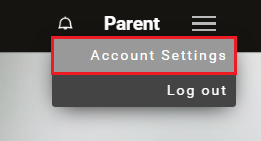
by 1. Access your family account. On the control panel, click the Menu icon in the upper right corner of the screen and select the Account Settings option from the drop-down menu.
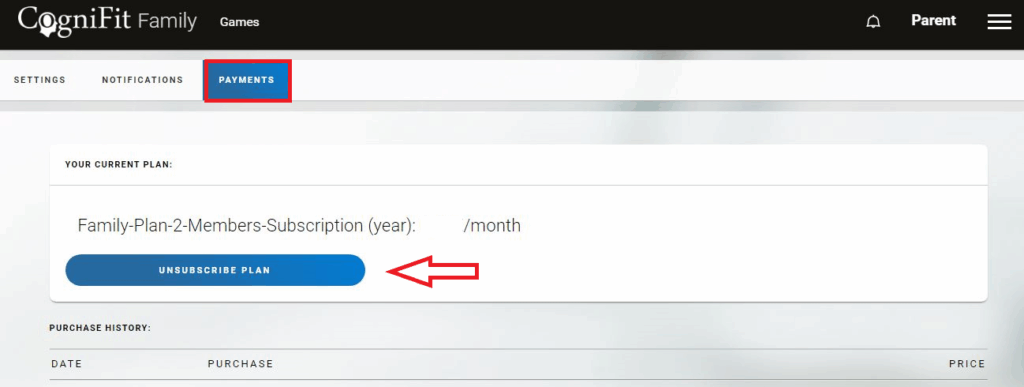
2. On the Settings page, go to the Payments tab. On this page you will see information about the current subscription plan that you have acquired for your family members. To cancel the subscription, press the “Unsubscribe Plan” button.
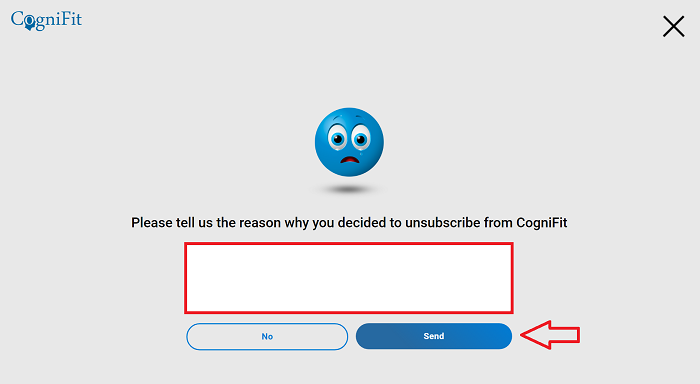
3. On the screen that appears, please let us know why you have decided to unsubscribe. To confirm the cancellation, click the “Send” button.
The subscription will be available until the end of the paid period.
Note: Our subscription plans are designed for two or more family members. If you only want to unsubscribe a member, deactivate the profile of this family member on the CogniFit Families platform following the instructions in this article. After deactivating a family member, you can assign their subscription to a new family member.
If you have any questions, you can contact our support team by sending an email to support@cognifit.com