 by
by 1. What Is the CogniFit Premium Subscription For Researchers?
The CogniFit Premium Subscription for Researchers allows researchers to create customized cognitive training programs to suit their study criteria and objectives, and personalize the participant experience.
In addition, the premium subscription offers an exclusive, permanent discount on all CogniFit products as well as the possibility of using the logo or image of your organization or research center in CogniFit tasks and results reports.
2. What Is Included in The CogniFit Premium Subscription for Researchers?
The Premium subscription includes all the tools that will allow you to optimize the application and analysis of your experimental study. With the CogniFit Premium subscription, researchers are able to:
- Have unlimited individual access to demos of each evaluation activity.
- Design personalized training sessions.
- Generate reports with their own corporate/institutional branding.
- Present games with their own corporate/institutional branding.
- Manage associated accounts.
- Take advantage of a 10% discount on all CogniFit products.
- Obtain 2 FREE licenses so they can get started.
- Test the platform with a free 14-day trial with no commitment to stay.
These features are in addition to the data already offered by the platform, such as:
- Activity log of each participant.
- Tracking and graphs of the progress of each participant.
- Downloadable reports for participants.
- Download raw data of all participants.
- Access data of the reference group for Z-score calculation.
- The full suite of training tools.
- The full suite of cognitive evaluation tools.
3. What Is the Difference Between the Basic Account for Researchers and the Premium Subscription?
The basic account for researchers includes the basic tools necessary to carry out an investigation. The premium account for researchers optimizes management processes, making its use simpler and more comfortable. In addition, the premium subscription grants allows researchers to make CogniFit adapt to the needs of their research, instead of having to adapt their research to the possibilities of CogniFit.
4. How Do I Register for the Premium Subscription?
To register for the Premium subscription, log in with your researcher account or create a new researcher account in CogniFit. In the main dashboard, select the option Premium Settings from the navigation menu. From the page that opens, you will be able to upgrade to the Premium account.

5. How much does a Premium Subscription cost? What Plans Are Available?
Subscriptions are available on a monthly or yearly basis*
*Prices valid for the USA only. Prices in the currency of your country may vary.
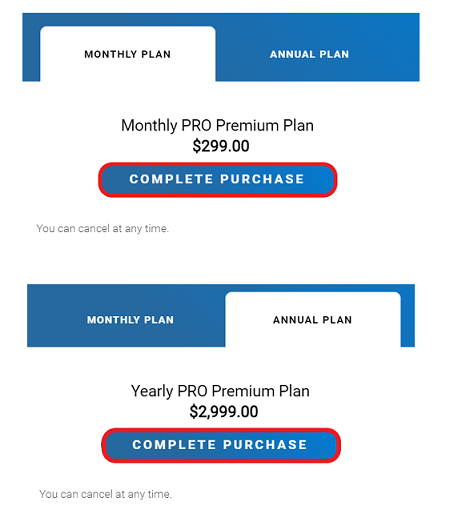
Select the desired plan and click on the “Complete purchase” button.
6. How Do I Purchase Licenses for the Premium Account?
The licenses for the Premium account can be purchased in the same way as for the basic account. However, all licenses purchased with a Premium account include a PERMANENT 10% discount.
7. How Can I Benefit from Having the Premium Subscription for My Study?
The standard version of the platform for researchers gives the possibility to comfortably implement a large number of experimental designs. However, the premium subscription provides multiple advantages that can be of great help for research:
- Unlimited access to the demonstration of each of the evaluations. This option does not save the results obtained in the evaluation tasks, and it will only be available from the researcher’s account (never from the participants’ account). It will allow the researcher (1) to familiarize themselves with the evaluation activities that the participants will carry out, (2) individually expose each of the participants to each evaluation activity so that they can test it (without saving the results), so that the researcher make sure that the participant has correctly understood the activity and is familiar with it. The researcher will be able to navigate comfortably through the evaluation tasks, being able to go directly to the activity that they are interested in testing.
- Creation of fully customizable trainings: researchers can choose the included stimulation games, the name of each training, and the image that is displayed.
- Researchers may include corporate/institution icon or logo on the platform that the participants see in the loading icons, in the games, in the results report, etc.
- Researchers can Manage multiple associated researcher accounts with the premium account. This is especially useful when different investigations are being carried out simultaneously, or when the same investigation is carried out from different centers or locations.
8. I Already Have a CogniFit Researcher Account. How Can I Upgrade to Premium?
Sign in to your account and follow the steps above on question 4.
9. How Do I Change or Cancel the Premium Subscription?
To cancel your Premium subscription, sign in to your CogniFit account and select Account Settings from the navigation menu in the top right corner. From the page that opens, select Payments.
If you want to switch from the monthly plan to the annual plan, select CHANGE PLAN. If you want to cancel the Premium subscription, click on the UNSUBSCRIBE PLAN button.
10. How Can I Add My Organization’s Logo to My Premium Account? Where Will It Appear?
The Premium subscription offers the possibility of using your organization’s logo and offering training programs and participant reports adapted to the corporate style of your university, association, company, or research center.
You can add a logo to the CogniFit games and reports interface with the results of your participants’ evaluations. This option appears after purchasing a Premium Subscription.
To add your organization’s logo, log into CogniFit and access thetab from the control panel on your home page Premium Settings. In the drop-down menu that opens, click the Add your logo button.
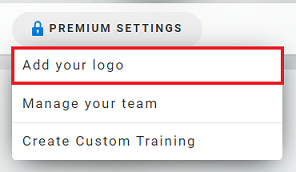
Follow the instructions on the page that opens.
11. How Can I Create Personalized Training Plans for Study Participants? How Do I Select the Games For The Personalized Training Plans?
The Premium subscription for researchers allows you to create personalized plans for your participants and create your own trainings, adapted in the best possible way to the needs of your research.
To create a personalized training session, log in to your Premium account and from the control panel on your home page, access the Premium Settings tab. In the drop-down menu that appears, choose the option Create Custom Training.
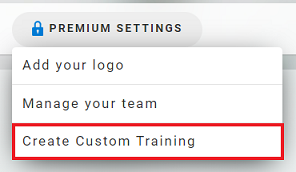
On the page that opens you can start creating custom trainings for your study participants.
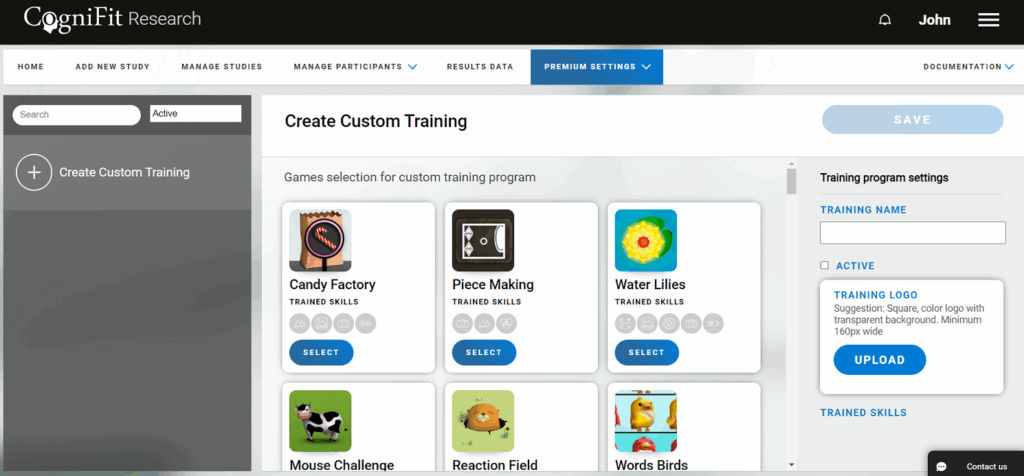
All CogniFit tasks are scientifically validated and designed to train certain cognitive skills. Depending on the cognitive abilities to train, you can choose the necessary games in your personalized stimulation plan for each participant.
To make your choice easier, we recommend that you read more information about the cognitive skills that help train different games on this page.
12. What Is the Sub-Account and How Can I Manage Sub-Account Licenses?
With a Premium subscription you can manage and administer any number of associated accounts from a single Premium account.
The sub-account refers to a researcher or scientific center account that you link to your Premium account. They can be the accounts of different members of the scientific team (researchers, scientists), departments or branches of your organization.
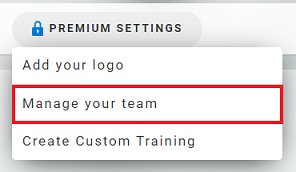
12.1 To access the management of these accounts, choose the tab Manage your team in the Premium Settings drop-down menu in the control panel of the main page of your account.
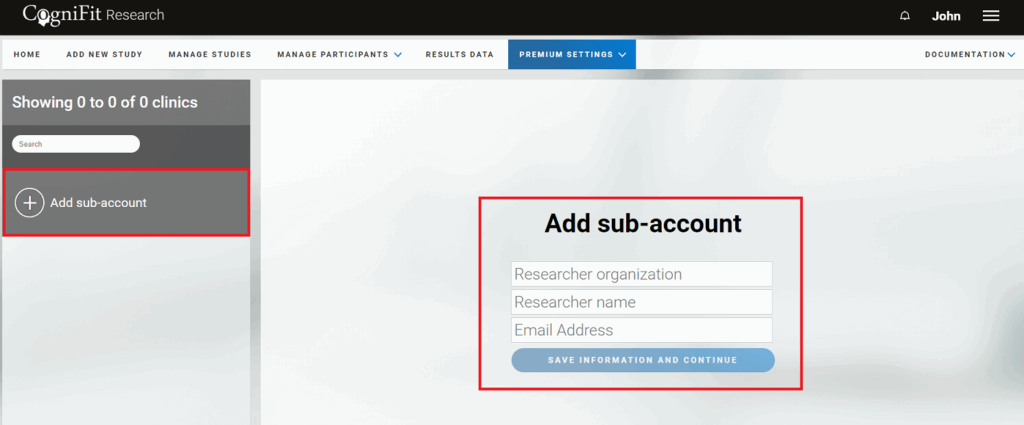
12.2 In the Premium Settings section, you can start inviting research organizations by clicking on the “Add sub-account” button and filling in the details of this sub-account. Here you can create a new researcher account or use an old one. You can add as many sub-accounts as you wish and add purchased licenses to them.
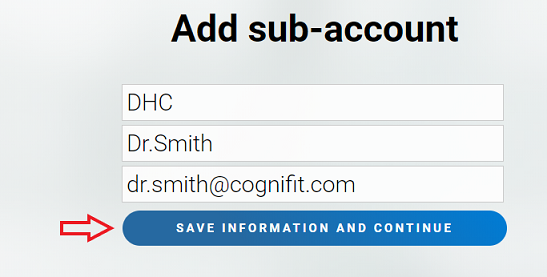
12.3 Once you have entered the data, click on the “Save information and continue” button.
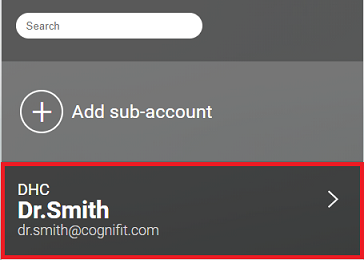
The account will be added to the list of subaccounts.
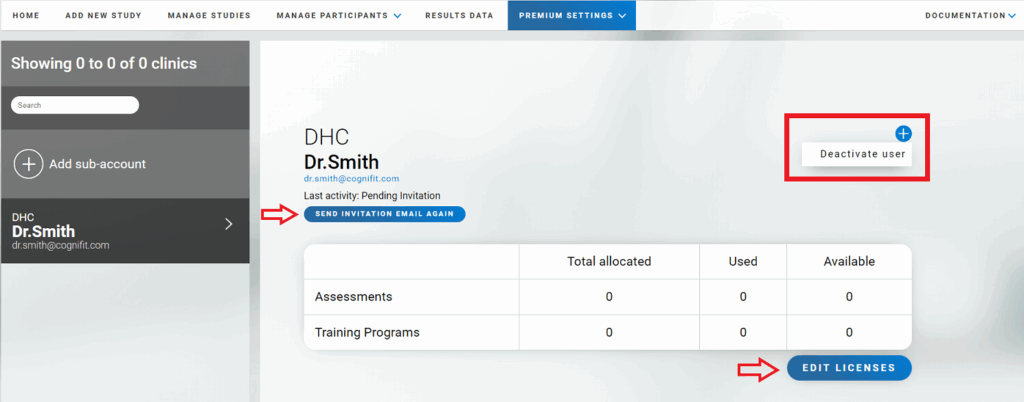
12.4 The added user must accept the invitation automatically sent by email. Once the invitation has been accepted, the owner of the Premium Account for Researchers can add licenses to the new researcher/research organization by clicking the “Edit Licenses” button. To delete a user, click on the “+” sign in the upper right corner of their profile page and then select the “Deactivate User” option.
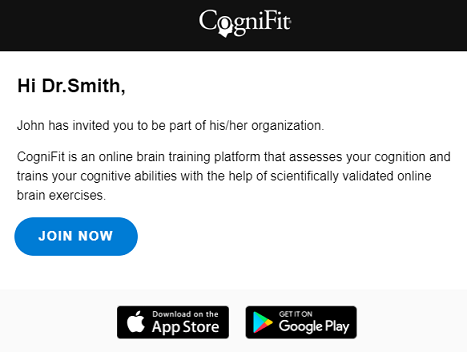
12.5 This is the email that the researcher/research organization will receive. To accept the invitation you must click on the “Join now” button.
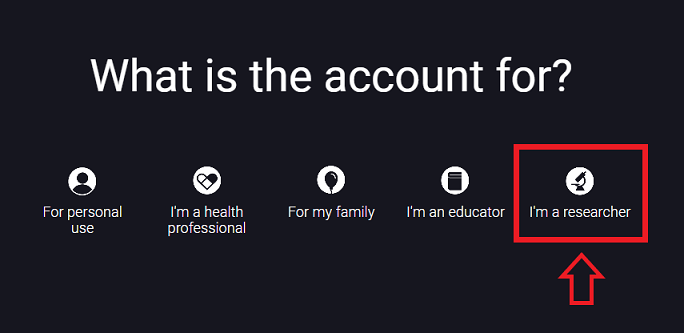
The registration page will then open. Select the option “I´m a researcher”.
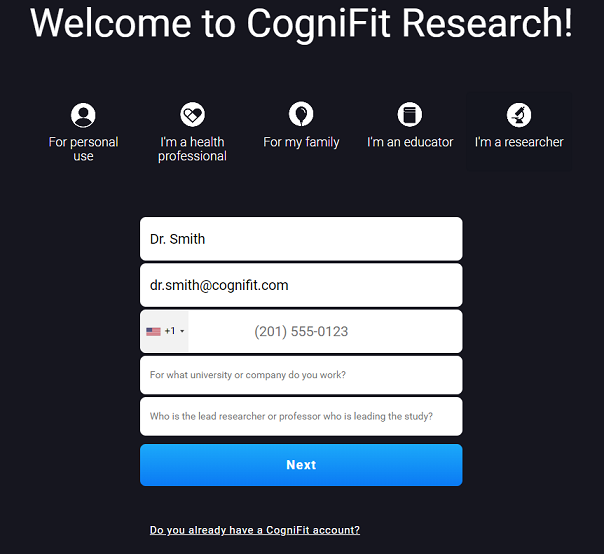
It is necessary to complete the registration by following the instructions on the platform. To register, please use the same e-mail address to which you received the invitation.
After entering your information and logging into your new account, an invitation will appear from the premium research account holder to become part of their organization.
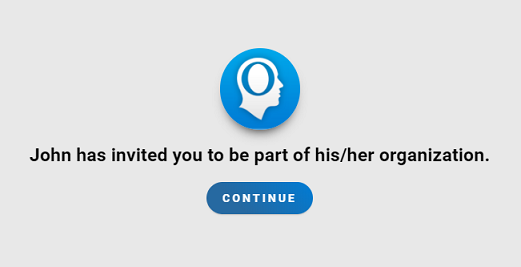
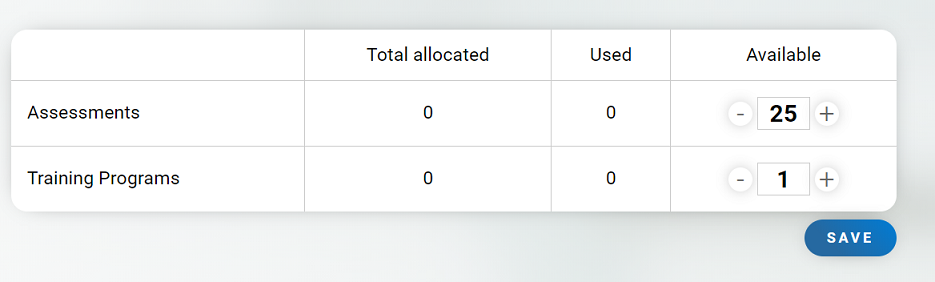
12.6 Once the researcher/research organization has accepted the invitation, the Premium account holder can assign the necessary licenses to the evaluations and/or trainings. Click on the “Edit Licenses” button, assign licenses (use “+” and/or “-” to assign/edit) and save the changes. Information about assigned and used licenses is available in the user profile.
13. How Do I Access the Demonstration of the Tasks That Make Up Each Assessment?
The Premium subscription for the Researcher account offers an exclusive opportunity to view the tasks and exercises included in each CogniFit cognitive assessment.
To access the demo, start creating your study. When selecting an assessment battery (in step 3.1), click on the “More Info” option.
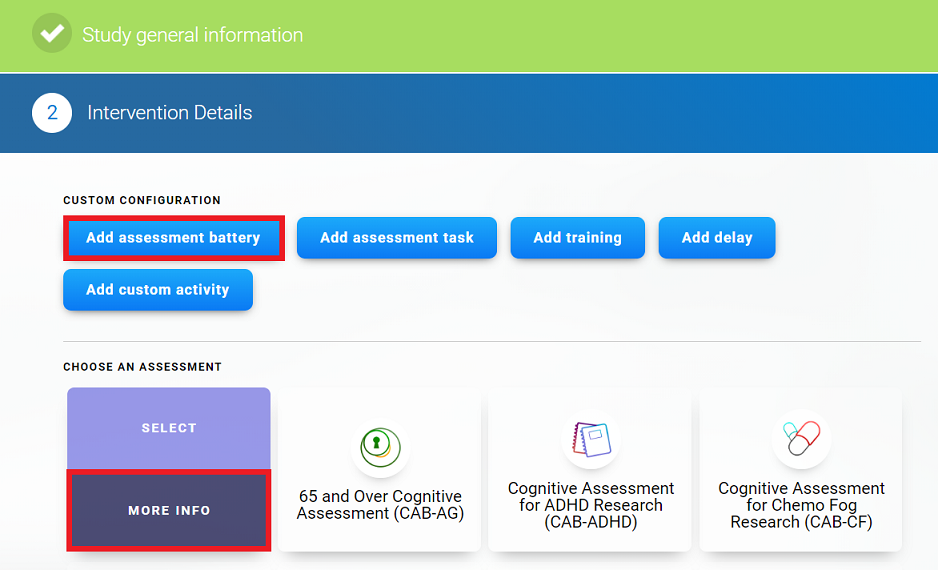
Once on the evaluation page, click the Assessment Demo button.
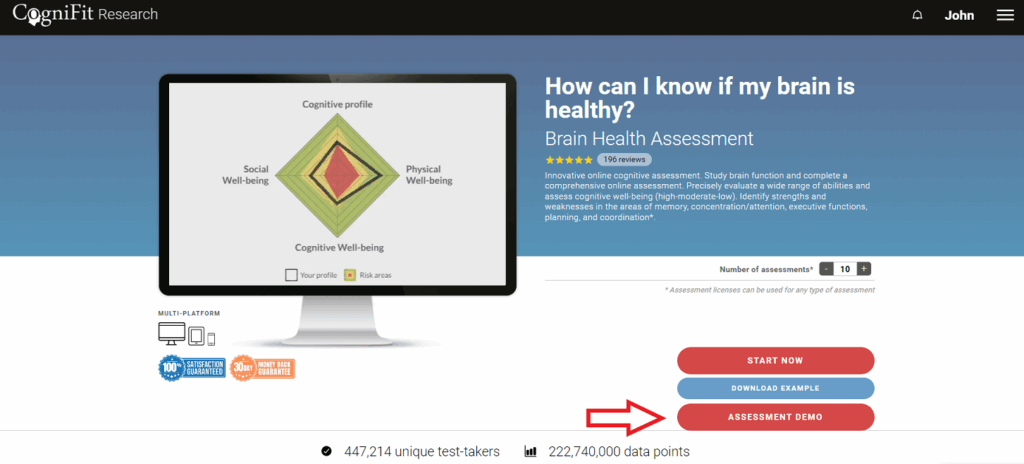
There you can navigate directly to the task or tasks of your interest, being able to skip those tasks that do not interest you or returning to the previous tasks. It is important to remember that this demonstration only serves to familiarize you with the activities, but will not save any cognitive data, nor will there be a record of it.
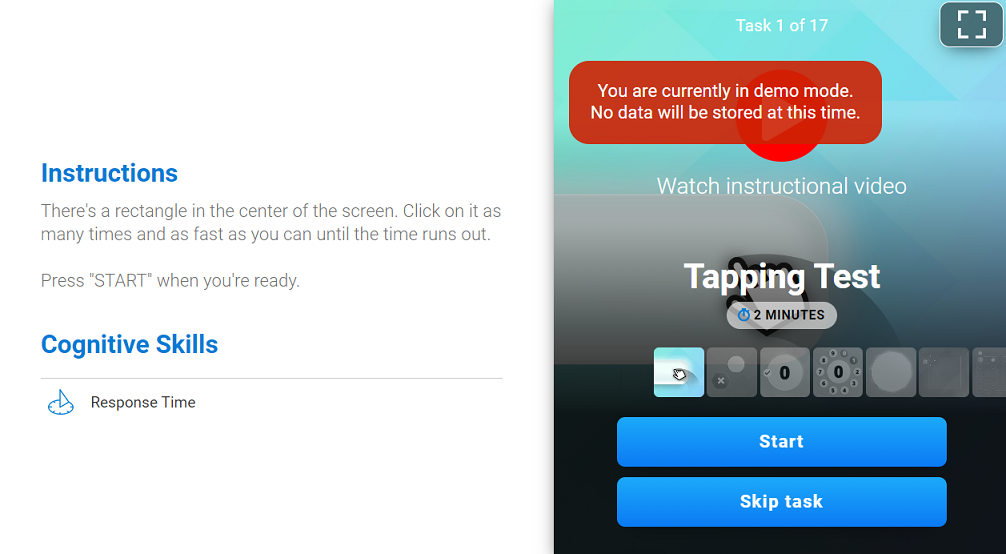
Attention: The demo is available for assessment batteries/tasks only.
14. Is the Premium Subscription Available for Other CogniFit Platforms?
Currently the Premium subscription is available only to healthcare professionals and researchers.
15. Is the Premium subscription for researchers available on mobile devices?
Like the basic account for researchers, the Premium account is only accessible from a computer through the Internet browser (from here, researchers will be able to invite participants and see both their activity and their results). Participants have the possibility of accessing their own CogniFit account from the App or from a computer, where they can take evaluations and training sessions (assigned by the researcher).
If you have any questions, you can contact our support team by sending an email to support@cognifit.com