 by
by For security reasons, we are not able to delete an account on behalf of a user. You must have access to the account in order to delete it from your account settings page. Click here to see how you can reset your password.
Please note that all data, scores, and information will be permanently deleted once you deactivate your account. It is not possible to recover information once an account is deleted.
Please ensure you have cancelled your subscription before you delete the account to prevent charges from the auto-renewal.
1. If you are using a computer
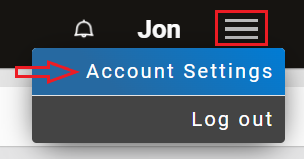
1.1 To get started, log into your account and click on the Menu icon in the top right corner and select from the drop-down menu Account Settings
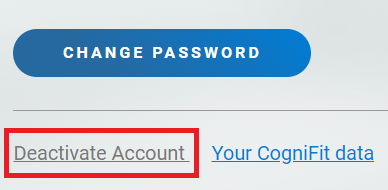
1.2 Scroll to the very bottom of the screen and click the gray Deactivate Account button
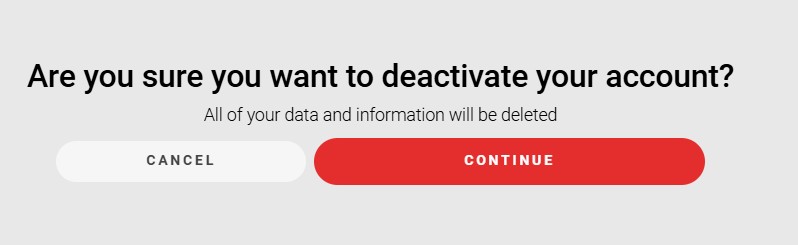
A new screen will appear. Click Continue if you are sure that you want to deactivate your account.
2. If you are using the mobile app
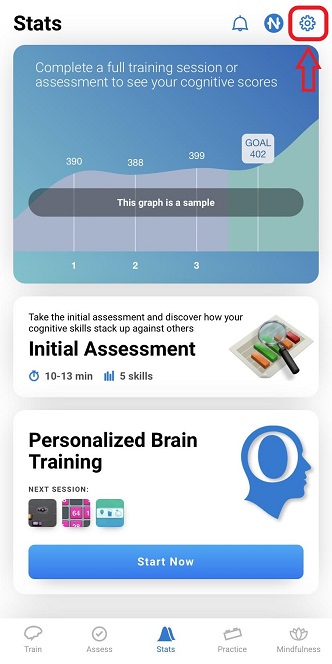
2.1 Log in to your account and click on the account settings icon
2.2 Next, click on the Profile button
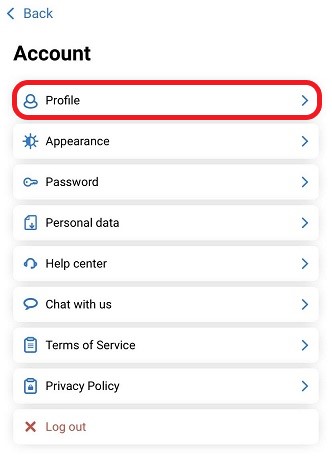
2.3 Next, scroll down to the end of the screen and choose Delete account
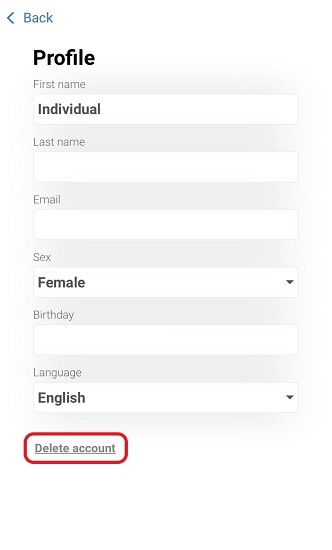
2.4 Are you sure you want to delete your account? If you are click on Delete account your account will be eliminated.
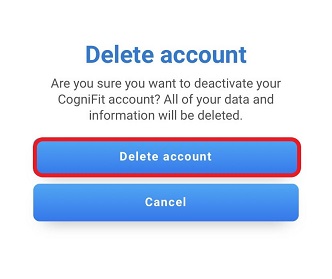
When you delete your account, your personal information will be removed permanently and will not be recoverable. You can always decide to create a new account at a later time.
If you have any questions you can contact our support team by sending an email to support@cognifit.com