Skip to content

CogniFit Help Center

Menu

Close
  • English
    • English
    • Español
    • Русский
  • English
    • English
    • Español
    • Русский
  • Home
  • PROFILE PAGE
  • Remove my profile picture

Remove my profile picture

PROFILE PAGE
by CogniFit March 10, 2026March 11, 2026

You can add or change your profile picture as often as you want. To remove your profile picture please follow the below steps. This feature is currently not available when using one of our mobile apps.


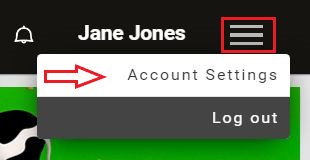
1. To get started, log into your account and click on the Menu icon in the top right corner and select from the drop-down menu Account Settings


2. Scroll down to the Picture area, and click Remove Picture

 

Posted in PROFILE PAGE

Post navigation

Previous:
Add or change your profile picture
Next:
How to change your password?

Categories

  • ACCOUNT AND PRIVACY
  • ACCOUNT SETTINGS
  • ASSESSMENTS
  • BRAIN TRAINING
  • COGNIFIT FOR FAMILIES
  • COGNIFIT FOR HEALTH PROFESSIONALS
  • COGNIFIT FOR RESEARCHERS
  • COGNIFIT FOR TEACHERS
  • COGNITIVE SKILLS
  • GAMES
  • GETTING STARTED
  • MINDFULNESS
  • MOBILE APPS
  • NOTIFICATIONS & EMAILS
  • PARTNERS INTEGRATIONS
  • PROFILE PAGE
  • PROFILE STRENGTH
  • SCIENCE
  • SCORES
  • SUBSCRIPTION
  • TRAINING & TASKS
  • TROUBLESHOOTING
  • VIDEO COACH

Recent Posts

  • What is the CogniFit for Researchers platform?
  • How can participants register for CogniFit?
  • How can I edit y my study design?
  • The CogniFit Premium Subscription for Researchers. Frequently Asked Questions.
  • How to Activate a Study Participant’s Account on Their Behalf
Copyright © 2026 CogniFit Help Center | Powered by KnowX WordPress Theme