 by
by The integration process with CogniFit is really simple and allows users of our partners to enjoy all the products and benefits of CogniFit directly from our partners’ applications or websites.
Let’s take a look at the easiest way to get started. The first step is to obtain partner credentials for API access.
To build your own white-label solution using the CogniFit API, please register on the CogniFit developers platform at: https://www.cognifit.com/developers
Once the partners have their credentials, they can begin registering users and assigning programs.
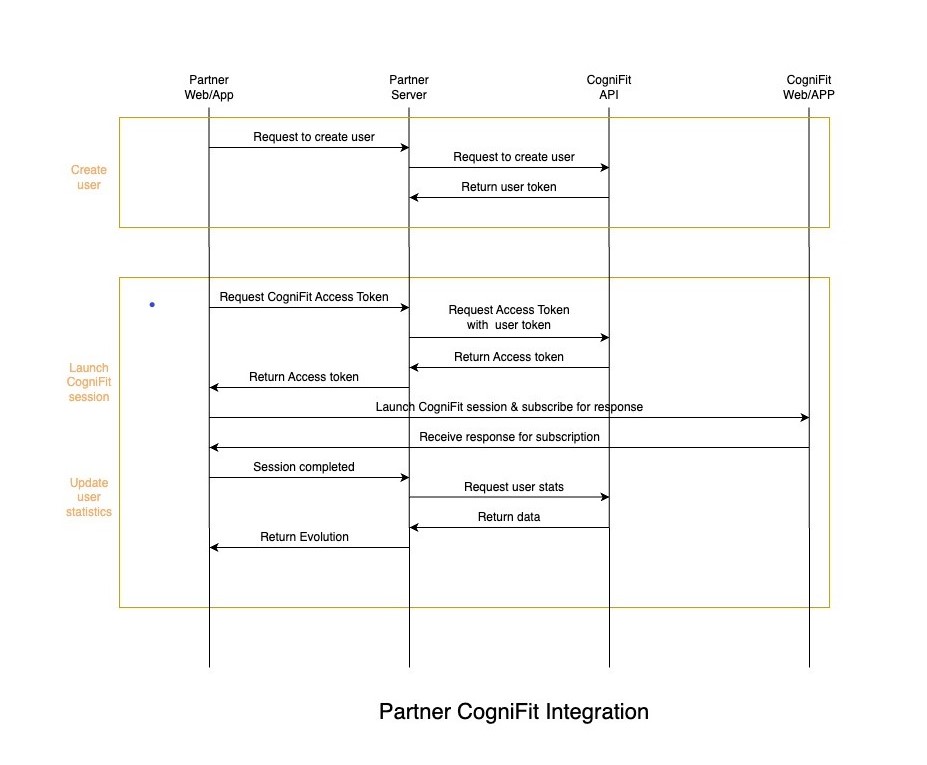
1. User Creation
For this action, the partner’s server will make a call to CogniFit using the user creation method of the API. This method will return a user token that the partner should store for future calls.
POST /registration
{
“client_id”: “{{clientId}}”,
“client_secret”: “{{clientSecret}}”,
“user_name”: “{{userName}}”,
“user_email”: “{{userEmail}}”,
“user_password”: “{{userPassword}}”, // If needed for allowing access to directly in CogniFit or a random hash
“user_birthday”: “{{userPassword}}”, // Format: 1981-07-15
“user_sex”: “{{userGender}}” // 0 for Female, 1 for male, -1 for unknown
}
This request is responding with a user_token that must be recorded in partner’ side for future requests.
2. Starting a CogniFit session
a. Getting access token
Before starting a session, it is necessary to make a new call to CogniFit API to get a user access token.
POST /issue-access-token
{
“client_id”:”{{clientId}}”,
“client_secret”:”{{clientSecret}}”,
“user_token”:”{{userToken}}”
}
This request is responded with an access_token that can be used once to start any CogniFIt session.
b. Launch CogniFit session
For this step, the easiest way is to use our Javascript SDK (https://www.npmjs.com/package/@cognifit/launcher-js-sdk). You will have to initialize it with your client ID and the access token.
3. Get user statistics
After the session is finished, you may request for user results. Assessment and training sessions are generating recalculated cognitive sessions. You can get these values from the historical score and skills method from the API.
POST /get-historical-score-and-skills
{
“client_id”:”{{clientId}}”,
“client_secret”:”{{clientSecret}}”,
“user_token”:”{{userToken}}”,
“initial_value”:0,
“total_points”: 50
}
For reference:
1. API documentation: https://api.cognifit.com
2. PHP SDK example for reference of integration with CogniFit’s API: https://packagist.org/packages/cognifit/cognifit-sdk-php.
3. Web app developed in Angular as a reference for the frontend: https://github.com/DaniOlivares/cognifit-integration-test.
4. Javascript SDK: https://www.npmjs.com/package/@cognifit/launcher-js-sdk