 by
by The comparison tool lets you compare yourself and users from all around the world. You can select different attributes such as country, profession, gender, and age and create your own comparisons.
Only CogniFit subscribers using a computer browser can see the cognitive comparison tool. Subscribe to CogniFit to unlock all the features, including the possibility to access the cognitive comparison tool. The comparison tool is currently not available when using one of our mobile apps.
To see the comparison tool, follow these steps:
1. Go to your profile page. To open the profile page log in to your CogniFit account and click on your name in the upper right corner of the screen.

2. Scroll down the profile page until you see the Comparision Tool. Use the drop-down menu to choose the options.
You can compare both the overall score and the scores of specific cognitive skills. You can also compare your results with users from different professions, countries, gender, age groups or year of birth.
Select the comparison options you are interested in and click on Compare.
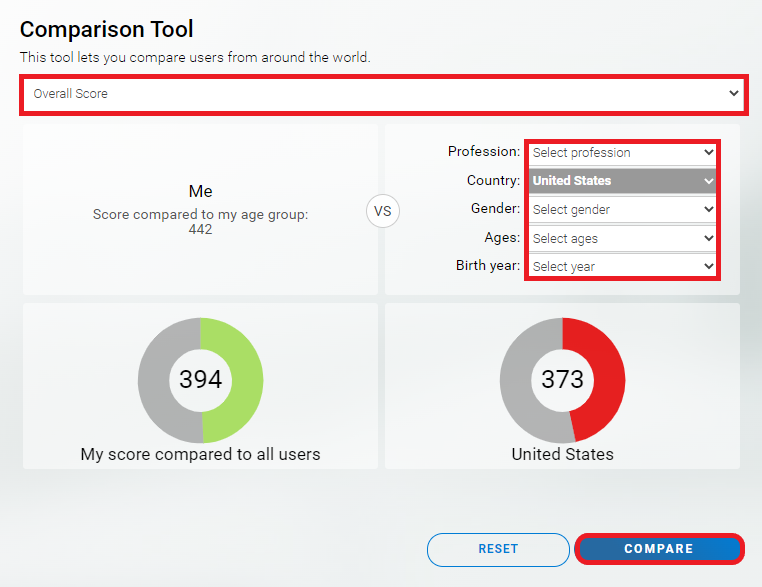
To choose other comparison parameters click on Reset.
Example: In our example, 442 is the overall cognitive score of the user as a function of his age group. 394 is the user’s score as a function of all users, and 373 is the user’s score compared to the population selected in the comparison tool (in our example, compared to other users in United States).
Learn more about CogniFit’s scoring system.